I see. But i had experience dealing with a hundred UDT instances.. Following the existing implementation, similar to your suggestion above, I added memory tag/custom parameters/properties. – I ended up having to click, edit, each instances to enter details. which is pain to manage.
Was thinking to tie to a database table, probably it is easier to manage. On view startup, query database for more details on the tag..
But I am stuck on thinking, how to identify each UDT instance uniquely, without using its tag path.
If you do not plan to allow runtime edits to the metadata, consider using something like my Spreadsheet Import Tool. Spreadsheets, with this tool, are a user-friendly way to maintain a relatively static "source of truth" for UDT instances.
IMO, any external reference only adds a layer of unnecessary complexity. I would spend time developing (or utilizing an existing) tool which is able to query &/or extract the data that you want, and then -optionally- modify it as needed. For example, a custom Perspective / Vision table could be developed which utilizes system.tag.query or system.tag.browse as a first-step in obtaining a filtered list of tag paths which match your criteria. Each table row could represent an instance UDT tag path, and each column bound to the parameter/property/tag, where you could perform runtime edits directly in the table (via tag binding, or system.tag.configure, system.tag.write*, etc.).
If you prefer to use an external tool (like Excel), I encourage you to explore a third-party option (like @pturmel's Import Tool he references above). Or, plan to spend a lot more time to develop the export/import functionality yourself (to ensure you're modifying only the things you wish to modify).
Keeping the data within the UDT and then updating it via tag path references in the database is definitely the way to go.
For updating that info from a database table you can choose different directions. One option below you can toss in the script console to look at the results. It'll do a browse of your provider and return the tag path for each instance of that UDT type. This list of tag paths can then be used to query your database to pull info for each of them and write updates into the UDT. The downside of this method is that it does have to browse every tag in your system which can be a consideration when you get into massive scale of tags. The upside to this method is you can add some error checking into the script to flag if you have a motor that isn't present in your database table, for example new assets get added and someone didn't add it to the table.
provider = '[default]'
target_udt = 'folderA/motorUDT'

# Minimal filter setup
tag_filter = {'typeId': target_udt, 'tagType': 'UdtInstance', 'recursive': True}

# One-liner to browse and extract fullPath
paths = [str(tag['fullPath']) for tag in system.tag.browse(provider, tag_filter).getResults()]

print paths
The other option that could be considered is using the database table as the master list. Do a query against the table and all the results from a tagpath column is your list of UDT paths to go update. Each row is a motor and it has the data right there so you can just run down the table and push all the updates via tag writes. This would be faster and more efficient but as with any scripting you need to be mindful of what happens if a user fat fingers a mistake in there. So there should always be some consideration to what happens if you write to a non-existent tag or write bad values and such.
Thanks for all the input above, I have finally put closure on this.
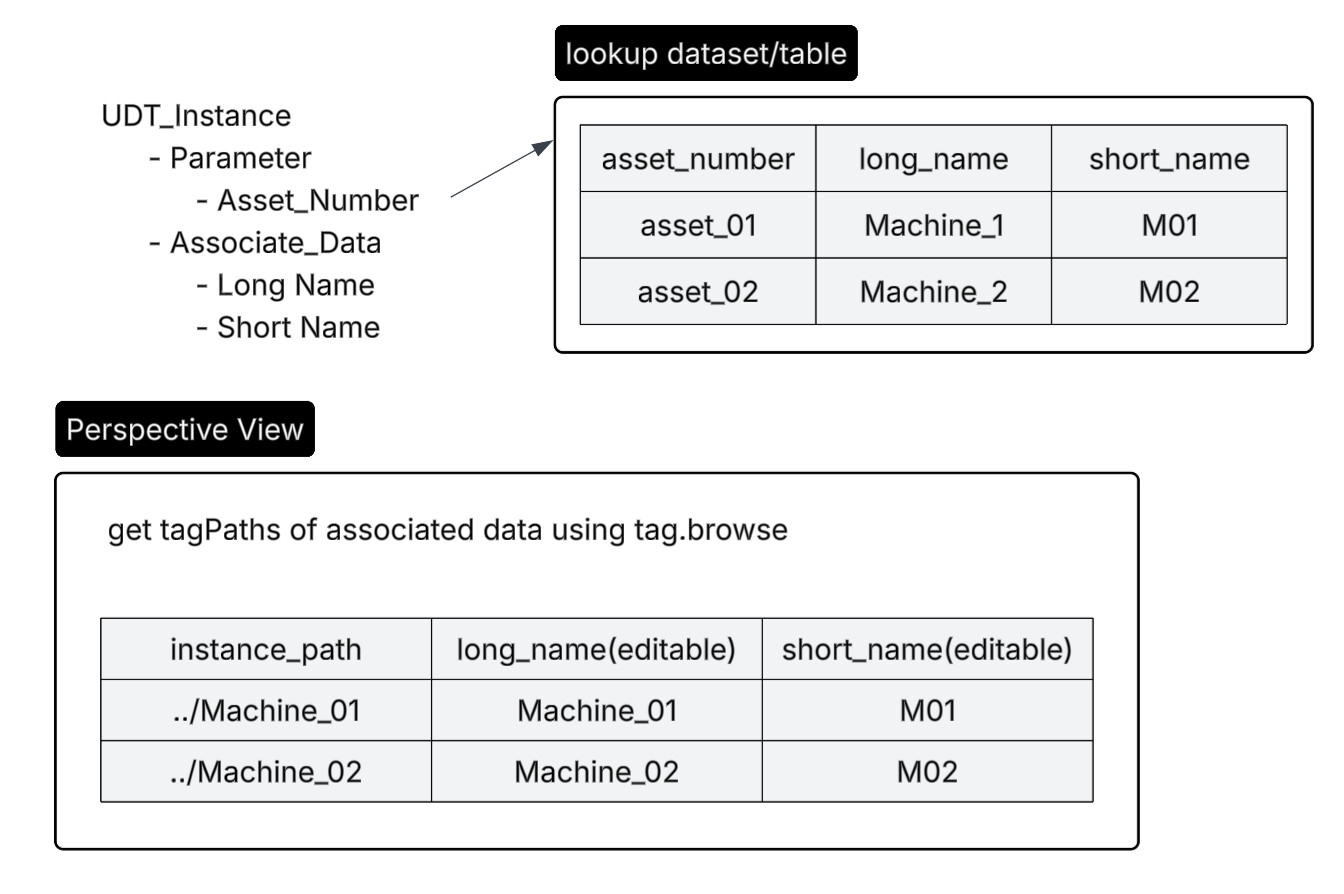
If Machine UDT Instance have asset number, i would create UDT Parameter Asset_Number.
And use this Asset_Number to lookup dataset or database table for associated data.
Another option, next time, if I have to edit hundreds of UDT instance static value, I would create a view, use system.tag.browse to get all desired tagPaths and feed it on table component, write to tag on edit cell event.
Both approaches seem reasonable. While I prefer the method that is easiest to reverse engineer (internal to Ignition), I’m less-opposed to the database method if the data is already maintained there OR will be used for other purposes.
I do have strong preference to maintain a single source of truth. As in, I recommend that you store machine data EITHER in the database OR as parameters/tags, etc, not both. Someone, someday, is likely to feel the pains of updating the wrong source.