Hi,
Is there any way to change the background color of a disabled text field?
Yes, this is possible.
First, you add the backgroundColor prop through the ‘+’-icon behind the Style property.
Then you add an expression binding to the newly added backgroundColor, where the first color is the true value and the second is the false value.
if({this.props.enabled}, "#000000","#FFFFFF")
You can test if it works, by manually toggling the Enabled value.
Consider using pre-defined colors from Perspective Built-In Themes | Ignition User Manual or add them to your CSS. This is the way of the web and far more easily maintained than hard-coding colors into components.
This should be done by modifying the disabled colour variable via the stylesheet or theme files, not with a binding. This will then affect all textfields, not just one (and it won’t add the unnecessary overhead and configuration of a binding).
E.g.
--input--disabled: hsl(0 0% 80%);
if you did want to apply it conditionally, then you can add it into a css rule:
.psc-bob {
    --input--disabled: hsl(0 0% 20%);
}
and apply it in the component with: styles.classes: bob
(I’d recommend adding bob** as a Perspective Style so that it’s selectable - it doesn’t need to contain anything)
** obviously don’t call your style “bob”… (I’ve reserved that name for myself)
This is the way.
If you don’t want to attach the change to a style class, then you would need to put it into the root
:root {
   --input--disabled: hsl(0 0% 20%);
}
But if you're attaching it to a style class, then it must be prefixed with psc- which stands for perspective style class. It's what ignition prefixes all user defined perspective styles with to avoid conflicts with its own default style classe names.
Eg.
.psc-sanj {
    --input--disabled: hsl(0 0% 20%);
}
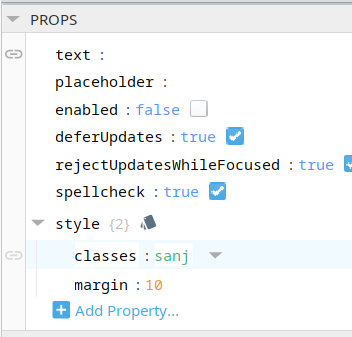
And then you would set the style.classes to sanj in your text field
Did you save the stylesheet? that looks like it should work. have you tried closing and re-opening the view? (you shouldn’t need to do that - although there is a bug in v8.3.1 where you did have to)
also, is the designer in run mode? disabled styling doesn’t show unless in run mode
yess its working now…probably had not saved properly