On our development server we’ve occasionally run into a situation where the Gateway memory usage climbs and does not get released. Restarting the Gateway usually clears this up and results in a significant reduction in memory usage. Otherwise, the memory can remain tied up for hours, or sometimes never gets released at all.
What I did to fix it
In the past, when I’ve run into similar issues, I was able to resolve them by restoring a smallerconfig.idbfile from backup. That approach worked because the Gateway could initialize cleanly with a lighter database.
In this particular case, however, the available backups were actually larger than the current file, so restoring them didn’t help.
As a workaround, I renamed the existing db folder to db_old and restarted the Gateway. After doing this, the Gateway was able to start again. All Gateway configuration was lost, but importantly, all Designer project resources were preserved — which was the most critical aspect for us.
Error details
The following error appears in the wrapper.log when the Gateway fails to start:
INFO | jvm 1 | 2025/12/02 11:39:47 | E [IgnitionGateway ] [17:39:47]: Error during context startup. INFO | jvm 1 | 2025/12/02 11:39:47 | org.sqlite.SQLiteException: [SQLITE_FULL] Insertion failed because database is full (database or disk is full) INFO | jvm 1 | 2025/12/02 11:39:47 | at org.sqlite.core.DB.newSQLException(DB.java:1179) INFO | jvm 1 | 2025/12/02 11:39:47 | at org.sqlite.core.DB.newSQLException(DB.java:1190) INFO | jvm 1 | 2025/12/02 11:39:47 | at org.sqlite.core.DB.throwex(DB.java:1150) INFO | jvm 1 | 2025/12/02 11:39:47 | at org.sqlite.core.NativeDB._exec_utf8(Native Method) INFO | jvm 1 | 2025/12/02 11:39:47 | at org.sqlite.core.NativeDB._exec(NativeDB.java:93) INFO | jvm 1 | 2025/12/02 11:39:47 | at org.sqlite.jdbc3.JDBC3Statement.lambda$executeLargeUpdate$2(JDBC3Statement.java:128) INFO | jvm 1 | 2025/12/02 11:39:47 | at org.sqlite.jdbc3.JDBC3Statement.withConnectionTimeout(JDBC3Statement.java:454) INFO | jvm 1 | 2025/12/02 11:39:47 | at org.sqlite.jdbc3.JDBC3Statement.executeLargeUpdate(JDBC3Statement.java:115) INFO | jvm 1 | 2025/12/02 11:39:47 | at org.sqlite.jdbc3.JDBC3Statement.executeUpdate(JDBC3Statement.java:102) INFO | jvm 1 | 2025/12/02 11:39:47 | at com.inductiveautomation.ignition.gateway.localdb.AbstractDBInterface.runUpdateQuery(AbstractDBInterface.java:222) INFO | jvm 1 | 2025/12/02 11:39:47 | at com.inductiveautomation.ignition.gateway.localdb.AbstractDBInterface.runUpdateQuery(AbstractDBInterface.java:236) INFO | jvm 1 | 2025/12/02 11:39:47 | at com.inductiveautomation.ignition.gateway.IgnitionGateway.startupInternal(IgnitionGateway.java:1238) INFO | jvm 1 | 2025/12/02 11:39:47 | at com.inductiveautomation.ignition.gateway.redundancy.RedundancyManagerImpl.startup(RedundancyManagerImpl.java:301) INFO | jvm 1 | 2025/12/02 11:39:47 | at com.inductiveautomation.ignition.gateway.IgnitionGateway.initRedundancy(IgnitionGateway.java:759) INFO | jvm 1 | 2025/12/02 11:39:47 | at com.inductiveautomation.ignition.gateway.IgnitionGateway.lambda$initInternal$0(IgnitionGateway.java:693) INFO | jvm 1 | 2025/12/02 11:39:47 | at com.inductiveautomation.ignition.common.execution.impl.BasicExecutionEngine$ThrowableCatchingRunnable.run(BasicExecutionEngine.java:544) INFO | jvm 1 | 2025/12/02 11:39:47 | at java.base/java.util.concurrent.Executors$RunnableAdapter.call(Unknown Source) INFO | jvm 1 | 2025/12/02 11:39:47 | at java.base/java.util.concurrent.FutureTask.run(Unknown Source) INFO | jvm 1 | 2025/12/02 11:39:47 | at java.base/java.util.concurrent.ScheduledThreadPoolExecutor$ScheduledFutureTask.run(Unknown Source) INFO | jvm 1 | 2025/12/02 11:39:47 | at java.base/java.util.concurrent.ThreadPoolExecutor.runWorker(Unknown Source) INFO | jvm 1 | 2025/12/02 11:39:47 | at java.base/java.util.concurrent.ThreadPoolExecutor$Worker.run(Unknown Source) INFO | jvm 1 | 2025/12/02 11:39:47 | at java.base/java.lang.Thread.run(Unknown Source) INFO | jvm 1 | 2025/12/02 11:39:47 | I [IgnitionGateway ] [17:39:47]: Ignition[state=STARTING] ContextState = FAULTED
My questions
Is there a better way to force Java / Ignition’s internal processes to release memory without requiring a full Gateway restart?
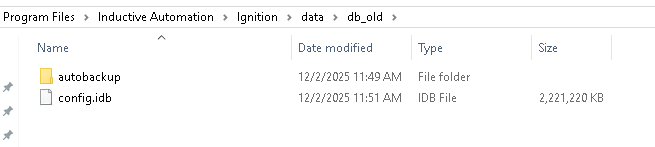
For this specific error, is there a reason why SQLite fails at around 2 GB of file size on restart? Below is a screenshot of the file size that consistently causes the Gateway to fault on startup.
This is an error that most likely indicates a lack of physical disk space. Unrelated to anything with system memory (a full disk is going to be catastrophic for almost any software that needs to read and write files).
No. The JVM will automatically run garbage collection whenever it can (increasing in frequency/consuming more CPU resources as the memory approaches configure limits). You can tune the garbage collection process with a variety of system flags, but it's not generally necessary or recommended. And frankly it sounds like your system is struggling for a variety of reasons, so any tweaking you do to system parameters is probably wasted effort.
As previously mentioned, the most likely cause of the SQLITE_FULL error is a lack of physical disk space on the server overall - SQLite needs some extra headroom so that it can atomically perform file updates to minimize the risk of DB file corruption even in exceptional scenarios.
It's definitely not normal to have an internal database anywhere near 2gB. Especially if the things you care the most about are projects - typically large internal database files are full of lots and lots of tag configuration data.
I would strongly recommend you contact our support department officially, because any help we can offer asynchronously via the forums (on whatever information you can publicly provide) is going to be substantially less targeted than a support rep connecting to your system live and doing in depth troubleshooting.
If you can't/won't/don't want to do that, the next step I would undertake is getting the sqlite_tools, a package of programs to run on the command line, one of which, sqlite_analyzer, can tell you what exactly is taking up all that space in the 2gB IDB file.
Good information here. We checked the disk space on both the entire server and the E: drive, and both appear to be fine. I’ll include the screenshots we captured during the fault below. Once I have a chance, I’ll dig into this further and may reach out to support if needed. Thank you for the quick response!
Side note: We have multiple tag providers, and some of them are very large. As we work, we typically disable the providers we don’t need at the moment. I usually turn off the biggest ones except for a single provider, then perform a restart. In this case, however, the load was simply too much.
JAVA will always pull the memory from the OS that corresponds to the initmemory in your ignition.conf up to the maxmemory in the same file. Typically for a production machine you set both of those to the same. Once JAVA has that memory, then it never releases it back to the OS. So if you are looking at taskmanager for memory usage, that isn't valid. You need to look at the gateway status page.
Oh yeah, that’s some good information there too, but that was two different spots.
The other memory checks were additional ones we ran after the Gateway faulted. What usually makes me restart the Gateway is when the Gateway memory usage climbs up to around 39/40 GB and just sits there. After a restart, it drops back down to about 20/40 GB and stays there for a while, sometimes days, sometimes less.
I’m not sure what “unusual” means in this context, because on this development server we regularly work with multiple tag providers. Altogether, there are over one million tags across all providers. Our typical process is that once we finish testing, QA/QC, or other work on a provider, we disable it in the Gateway and then enable the next one as needed.
Side note: When we bring tags over from a live server, they include Historian, SQL, and other resource‑intensive connections that aren’t configured in the DEV environment. This can increase log errors in some cases, since we don’t always disable those connections while working.
Script testing is a major aspect of our development environment, but I don’t believe there are any serial ports or APIs involved. We do, however, use some imported libraries, including:
import os
import csv
import io
from datetime import datetime
Once we have time, we plan to reach out to support. My current thought is that even when a tag provider is disabled, the associated SQL database information may still remain active. Before contacting support, we want to test a different approach: instead of simply disabling a provider once we’re finished with it, we’ll delete it entirely. If that doesn’t resolve the issue, our next step will be to open a support case.
Not that it’s the point of this post but you should never be using datetime. It’s a different object type from what any ignition component wants. Use the system.date.* functions and then any date’s you calculate with that will automatically work with any ignition function/component.
os I use too for file/folder creation its fine and has never given me a problem.
csv you can use first party functions like the system.dataset.fromCSV / system.dataset.toCSV. Some jython implementations of these libraries have known perfomance/memory issues though I am not familiar with any known ones with csv.
io you can probably replace by just using the system.file.* namespace.
Over the forum you will find the general advice that you should use
First party functions system.* first
Java libraries directly
jython libraries as a last resort due to issues that can be hard to run down.
I would recommend trying to rewrite scripts with that in mind. I can’t say that’s definitely your issue but its better to just write things like that to make sure it isn’t and for easier integration into the rest of the ignition ecosystem.
You really need to stop doing that. Use the java alternatives for those basic functions from the jython stdlib. The jython stdlib is from Python 2.7, and is rather old and crusty in modern environments (especially datetime and io).
Oh, this is really good to know! datetime is currently only being used to generate output CSV file names, but I’ll keep this in mind for any Ignition‑related usage going forward. I may try the Ignition feature you mentioned to see if it works as well — if so, I’ll remove the custom implementation altogether.
As for io, I’ve been using it with the CSV upload component. When we read in a CSV file, it gets converted into a string, and io.StringIO allows us to treat that string like a file object so it can be parsed as a CSV. I believe I originally found that approach in one of the forum posts. I’ll also try the method you suggested, and if it works, I’ll implement that instead.
We currently have someone working on a task who used Ignition documentation to implement their solution. Specifically, they referenced documentation that describes importing a CSV file generated from downloaded software and then loading that data into Ignition for a specific use case.
Given that the approach involves importing a CSV, there is some concern about whether this is considered best practice. However, the Ignition documentation indicates that this method is acceptable.
In this situation, what should be considered the source of truth for determining best practice?
IIRC, the jython csv package cannot be trusted with unicode content. IA's documentation has many examples from many years ago, when system.* functions didn't exist yet, and/or the problems with jython's stdlib weren't well-recognized.
I'd trust this forum over the docs, where they conflict.
For advanced topics, sure. But for all fundamentals (which majority of all project development should adhere to), a better suggestion would be to trust the docs, but also to help hold them to a high standard (for those that are capable). I know they are receptive to updates that make sense.