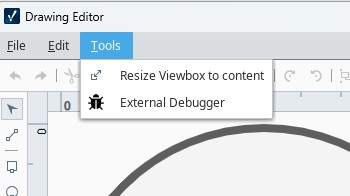
It's only happened twice so far but at some point I lose the ability to select individual objects with the selection tool.
Even when adding a new circle or square it does add it but there's no handles so I can't click or drag anything around the screen. I'm not sure if I'm missing some mode of some kind. I tried closing the views and reopening them but it did the same thing I tried adding a drawing object but it was doing the same thing only after closing Ignition Designer and reopening it did the issue go away.
I wouldn't mind having this handleless mode especially when working in a perspective view. Oftentimes the handles are too big and get in a way when trying to al smaller objects.
I'm not sure yet what sets it off but I'm just drawing objects and moving them around and then all of a sudden I can't really select anything. Even if I right click on an element most of its options are gone, ghosted out.
I was actually just Working with support on this and we haven't found anything yet but I wanted to go ahead and post what the DevTools console showed.
Stopping and restarting the gateway doesn't help. If I reboot the Ignition Designer it's good again for a while but then after I close the drawing and opened it a few times and then selecting one of the elements down in the lower right the handles disappeared and once they're gone it doesn't matter if I create a new drawing or open the same drawing I don't have the handles for any of the objects.
In the example below when I click on the circle and square I can see the highlighted element at the lower right change but I don't get the handles to move or resize the object. Sometimes I don't even have the option to delete other times I do even when I don't have handles.
I also wonder if it's the particular SVG file that importing or embedding into the view, maybe there's something about that SVG that it doesn't like.
That console error is very helpful. I have a hunch of what the issue could be: I think the Drawing Editor is having trouble generating a selection outline for the outline type, causing it to error out after it’s selected.
Would you mind providing the SVG or Drawing Component props (here or in direct message), so I can verify and identity which element type is the cause.
I often run into issues with the svg editor when opening a binding pop-up through the editor the pop-up is just blank. is this a known issue? if not let me know what info I can provide.
It looks like drawing editor doesn't support line types is that correct? So unlike perspective labels where you can add a border and then select it to be dot or dash, there's no option for that in the Perspective drawing editor? You would have create those line types in whatever editor you're using to create the SVG file and make multiple layers with visibility property maybe?
running JSON.stringify(__editorStore._model) while in this state would be helpful, send the screenshot/text to me. It’ll show me the state of the Drawing Editor’s model, including the Drawing Component’s props and propertyConfigColection(bindings)
exact reproduction steps (if possible) ie 1. Select Element “XYZ” 2. Open the bindings for the Fill property 3. observe the empty bindings
for visibility: this particular issue appears to be due to clip-paths generated in InkScape not being interpreted correctly by a third party library, throwing an error in the Drawing Editor’s generation of selection outlines. A bug ticket has been made and an equivalent SVG sans the clip-path has been provided.
I've also noticed that none of the drop downs work. If I select them and use the arrow keys I can change the options but pull down arrow that implies there will be a drop down list to look at, doesn't work for any of them currently.
There doesn't appear to be any way to resize objects and keep the aspect ratio or height and width, proportional. The only option appears to be the control key that forces the height and width to be the same. This looks to be the same views the drawing editor.
When moving and resizing objects inside a coordinate container in a Perspective view, I can use the shift key to resize the object with the keyboard arrows versus just moving it. The alt key lets you take bigger steps and the control key lets you change the direction of the resize.
It'd be great if they were the same in the Drawing Editor, currently it uses the alt key to take bigger steps when moving but if you use the shift key to resize it uses the control key to take bigger steps and there's no way to change which direction you're sizing.
Dragging a selection box from the left selects anything you cross and dragging it from the right selects anything you encompass. That's nice but it should use a keyboard modifier so that you can choose one or the other regardless of which direction you need to drag and there should be a keyboard modifier so you can start the drag wherever you want in perspective views.
I am able to reproduce it by opening a binding, not changing anything and clicking ok to close it. It doesnt always happen but if I do the same actions 3-5 times in a row it happens.
here is another console output after reproducing it again :
it appears that you are running JSON.stringify(__editorStore._selection), please run JSON.stringify(__editorStore._model) instead. I’m interested in what the model looks like when it’s in this state
I've also noticed that none of the drop downs work. If I select them and use the arrow keys I can change the options but pull down arrow that implies there will be a drop down list to look at, doesn't work for any of them currently.
that’s very odd, under the hood these are basic <select> HTML elements, which leads me to suspect that somehow you’ve activated a built-in OS or JXBrowser accessibility mode.
There doesn't appear to be any way to resize objects and keep the aspect ratio or height and width, proportional. The only option appears to be the control key that forces the height and width to be the same. This looks to be the same views the drawing editor.
That' would be a nice enhancement, I’ll consider logging a ticket for it.
When moving and resizing objects inside a coordinate container in a Perspective view, I can use the shift key to resize the object with the keyboard arrows versus just moving it. The alt key lets you take bigger steps and the control key lets you change the direction of the resize.
It'd be great if they were the same in the Drawing Editor, currently it uses the alt key to take bigger steps when moving but if you use the shift key to resize it uses the control key to take bigger steps and there's no way to change which direction you're sizing.
Comparing the Designer side by side with the Drawing Editor, I do see inconsistencies that could be improved. I’ll definitely log a ticket for it
Dragging a selection box from the left selects anything you cross and dragging it from the right selects anything you encompass. That's nice but it should use a keyboard modifier so that you can choose one or the other regardless of which direction you need to drag and there should be a keyboard modifier so you can start the drag wherever you want in perspective views.
This is a bigger ask, as we would want to ensure consistency with the Designer, I’ll consider logging a ticket for it.
For the drop downs, restarting designer seems fix it but all I have to do is close the drawing editor without doing anything double click on the object again and then the drop downs don't work anymore. I'm not sure what's setting it off.
Having a key you can hold down and keep the aspect ratio is pretty standard. You've drawn an object made of a bunch of other objects, grouped it, got it the way you want it and now you just want to make it a little bigger/smaller. It looks like there's no way to do this in Perspective or the new Drawing Editor, does Vision have that ability?
Dragging the selection box, the behavior seems to be the same in Perspective Designer and new Drawing Editor, it'd just be nice to have keys to modify the type of box and the ability to start the selection box wherever you want. Inevitably there's always something in the way and you can't start the box where you would like or starting the selection box from the left side is clear and dragging it over what you want but then it's not the type of selection box you want to use.
I've only seen that function on one or two HMIs, I can't remember (InTouch?) which one but you could hold down the shift or alt or something and allow you to click and select an object without moving it accidentally and also be able to start a drag selection box without selecting objects.
Another oddity I've seen in both is when copying multiple objects on top of each other it likes to change the layer order so when you paste it you keep having to change the layer order and move one object on top of the other.
The original objects on the left have the dark gray shading on top but when those are selected and copied with a selection window then it keeps moving the dark gray object to the background. If you can manually select each object in a particular order it'll stay the same when pasted.