Ignition queryTagHistory returning extra row compared to history partition table

In Ignition, I have two tags with history enabled in On Change mode. When the tag values changed, I verified in the history partition table and confirmed that the values were recorded there.

However, when I try to retrieve the values using the system.tag.queryTagHistory function always returns two rows, even though the history table contains only one row for that time range.

I set the start and end time with just a one-second difference. I also tried different options, such as noInterpolation = True, and different aggregation modes like LastValue, Count, and IntervalSeconds, but it still returns two rows.

Has anyone faced a similar issue? Please help.

I’ve attached the history table data and my script below.
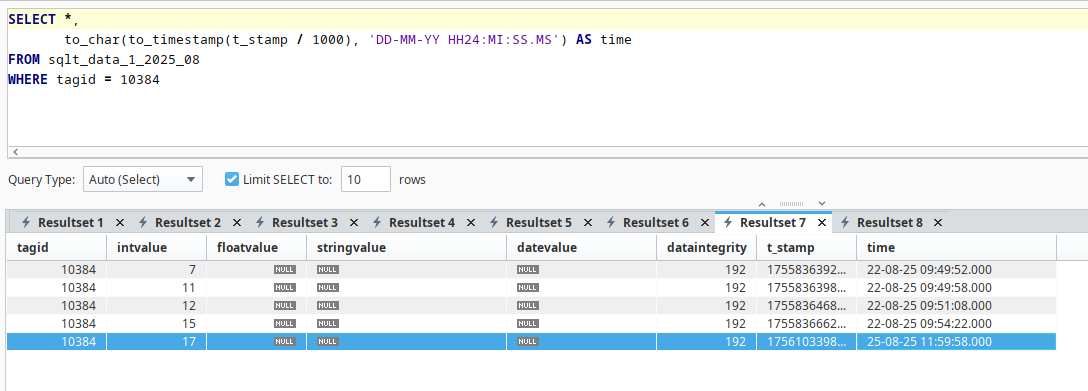

Script :

t_stamp = "2025-08-25 11:59:58"

new_path = '[cms]test_ar/New Tag'

new_path_1 = '[cms]test_ar/New Tag 1'

start = system.date.parse(t_stamp)

end = system.date.addSeconds(start, 1)

value = system.tag.queryTagHistory( paths=[new_path,new_path_1], startDate=start, endDate=end )

Set IntervalSeconds=2. I think it means that the length of one second covers two specific seconds.

Or , use returnSize=1.

And, edit your post and fix the code formatting as shown in Wiki - how to post code on this forum .

Your tag history t_stamps look the same but will differ by some milliseconds. That makes them different timestamps. Whenever you bring back data in Wide format the table will contain a new row for every new timestamp. Note how it found the first entry for NewTag and left the NewTag1 column empty. Then it found the entry for NewTag1, created a new row and repeated the last seen value in the NewTag column.

Using Tall format solves this problem but it means you have to convert to Wide format by script.

You should not convert tall to wide format. You should only group by the tag path and keep the groups separate. Otherwise you either re-introduce the problem with native wide format, or you throw away actual timestamps.

1 Like