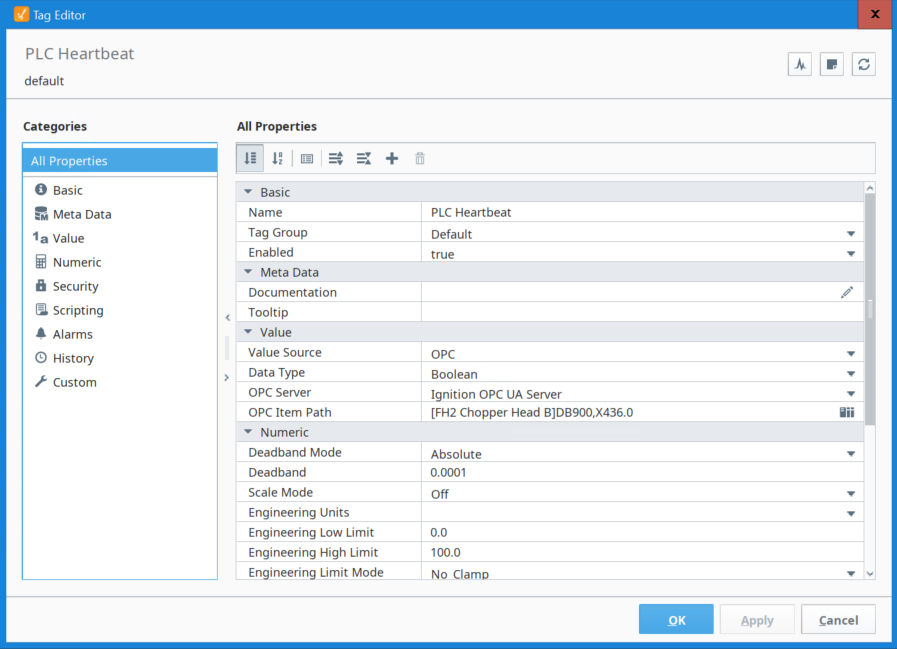
I am using Ignition Version 8.1.44, and using S7-1500 driver, I am connected to Siemens s7-1500 PLC. The Firmware of the Siemens PLC is 3.x.
The connection between PLC and Ignition is successful. The Optimized Block Access is OFF for the particular block, and Get/Put through setting is ON.
Yet, I am not able to read the tag data. the quality is showing bad. I confirmed the physical address and the syntax to fetch data in Ignition, and both are correct.
Please help me here to understand what is the thing in PLC (may be TSL or other) which is not allowing Ignition to read data. And how can I connect to it.
Note: I don’t have much access to Siemens PLC as it is in a plant managed by a Vendor. However, I can ask vendor to check few settings if required.
Please guide. Thank you!
Attached is screenshot of tag configuration.

Is there an error in your gateway logs from the com.inductiveautomation.xopc.drivers.siemens.requests.ReadRequest logger?
Hello Kevin, Here is the error:
|
| Error reading S7ReadResponse. Error code = 8104. |
8104 is the access denied error code.
You're either reading an address/offset that doesn't exist, or the optimized block and PUT/GET settings have not correctly been applied.
Many people make the mistake when changing those settings of not compiling both the hardware and software configuration before downloading in TIA Portal.
Hey Kevin, I am kind of agree with you. Can you help me what things a vendor needs to consider, because he showed me that Get/Put through is marked and Optimized block access is OFF. And I don’t know what to tell him that is wrong.
If you can just guide me what do you mean by not correctly configuring hardware and software.
Thank you for your help!!
This is a random screenshot from the internet, so not sure what TIA portal version, but when those configuration changes are made they have to be followed by this:
Then downloading the program changes.
Thank you very much Kevin for all your Help!
we made changes you told and it started working.
Thanks again!!