The Page Size dropdown on a table is disappearing on a small width view. How do I fix this visual?
Desktop Width:

Mobile Width:
You could add a Dropdown on the mobile view and bind it to the tables pager properties.
What I was just working on as a temp fix. Was hoping I am missing a setting or something obvious.
I’d think you need the activeOption property. You could test with initialOption.
What version of Ignition are you working with?
Assuming your pager options are this:
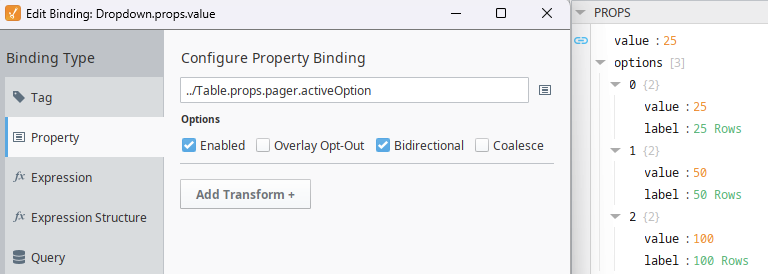
You would add a bidirectional binding to props.value ←→ table.pager.activeOption with your props.options setup like so:
Optionally, and probably better, is to add a binding on the table and point to the Dropdowns.props.value.
Maybe a bug? Check in devtools if it’s still in the Dom. If it is, you can fix it, if not, you'll have to roll your own.
To roll your own and position in the same place, I'd be adding the table and a drop down into a flex, then setting the dropdowns to position: absolute, then position it with left and bottom. There are examples on the forum.
You’ll most likely need to set the position on your flex container to relativeso that the dropdown position is relative to the flex and not the whole page
activeOption was introduced in 8.1.45. You might be out of luck with your version.