Hi all ,
I have to test Sepasoft's OEE and track and trace module in my new company, but I can't follow the tutorial..
I'm in ignition version 8.3.1, I installed the production and trace module in version 4.83.0-rc4.
I have already had difficulties installing these modules, and now I am facing another difficulty that I cannot unlock.
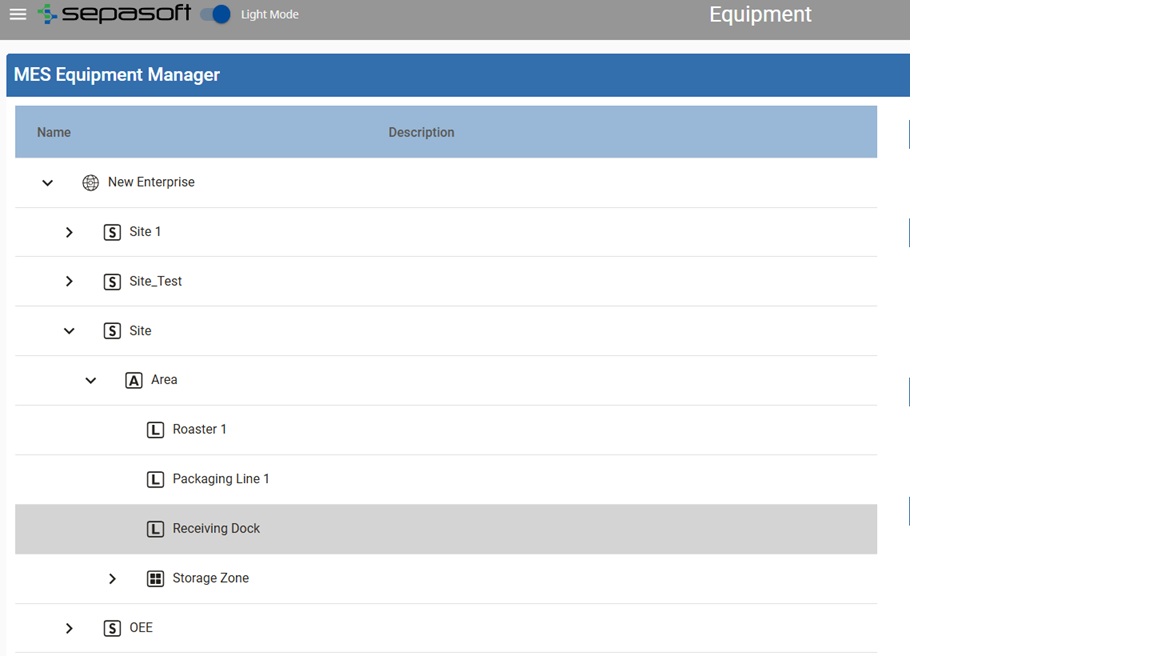
By following the procedure, I manage to create the path like here:

It is not required to recreate this tree in the tags.
I then followed the tutorial to create this view:

Mais en cliquant sur « receive Raw Beans 1 », j’ai déjà cette erreur , comme s’il ne trouvait pas le chemin :
com.inductiveautomation.ignition.common.script.JythonExecException: Traceback (most recent call last): File "function:runAction", line 16, in runAction at com.google.common.cache.LocalCache$Segment.getAndRecordStats(LocalCache.java:2347) at com.google.common.cache.LocalCache$Segment.loadSync(LocalCache.java:2313) at com.google.common.cache.LocalCache$Segment.lockedGetOrLoad(LocalCache.java:2189) at com.google.common.cache.LocalCache$Segment.get(LocalCache.java:2079) at com.google.common.cache.LocalCache.get(LocalCache.java:4011) at com.google.common.cache.LocalCache.getOrLoad(LocalCache.java:4034) at com.google.common.cache.LocalCache$LocalLoadingCache.get(LocalCache.java:5010) at com.sepasoft.production.mes.manager.MESObjectManager.getMESObjectLinkByEquipmentPath(MESObjectManager.java:3191) at com.sepasoft.production.gateway.manager.AbstractMESObjectManager.getMESObjectLinkByEquipmentPath(AbstractMESObjectManager.java:514) at com.sepasoft.production.mes.manager.RecordOperation.recordOperation(RecordOperation.java:43) at com.sepasoft.production.mes.manager.MESOperationsManager.recordOperation(MESOperationsManager.java:1838) at com.sepasoft.production.mes.manager.MESOperationsManager$ByteBuddy$uAQ6VJeW.recordOperation$accessor$7lPwfOIj(Unknown Source) at com.sepasoft.production.mes.manager.MESOperationsManager$ByteBuddy$uAQ6VJeW$auxiliary$OsxXSIer.call(Unknown Source) at com.sepasoft.monitor.MonitorEngine.monitorRunDuration(MonitorEngine.java:222) at com.sepasoft.monitor.MonitorEngine.monitor(MonitorEngine.java:125) at com.sepasoft.monitor.MonitorEngine.monitor(MonitorEngine.java:111) at com.sepasoft.monitor.MonitoringInterceptor.intercept(MonitoringInterceptor.java:23) at com.sepasoft.production.mes.manager.MESOperationsManager$ByteBuddy$uAQ6VJeW.recordOperation(Unknown Source) at com.sepasoft.production.gateway.ProductionRPCHandler.recordOperation(ProductionRPCHandler.java:1007) at com.sepasoft.production.gateway.script.TraceGatewayScript.recordOperationImpl(TraceGatewayScript.java:19) at com.sepasoft.production.script.AbstractTraceScript.recordOperation(AbstractTraceScript.java:303) at java.base/jdk.internal.reflect.NativeMethodAccessorImpl.invoke0(Native Method) at java.base/jdk.internal.reflect.NativeMethodAccessorImpl.invoke(Unknown Source) at java.base/jdk.internal.reflect.DelegatingMethodAccessorImpl.invoke(Unknown Source) at java.base/java.lang.reflect.Method.invoke(Unknown Source) com.google.common.cache.CacheLoader$InvalidCacheLoadException: com.google.common.cache.CacheLoader$InvalidCacheLoadException: CacheLoader returned null for key New Enterprise\Site\Area\Receiving Dock
· I tried to fix it by replacing the \ with /, but I have the same problem.
Has anyone ever encountered the problem and may know the solution?
Thank you all
Merci à tous