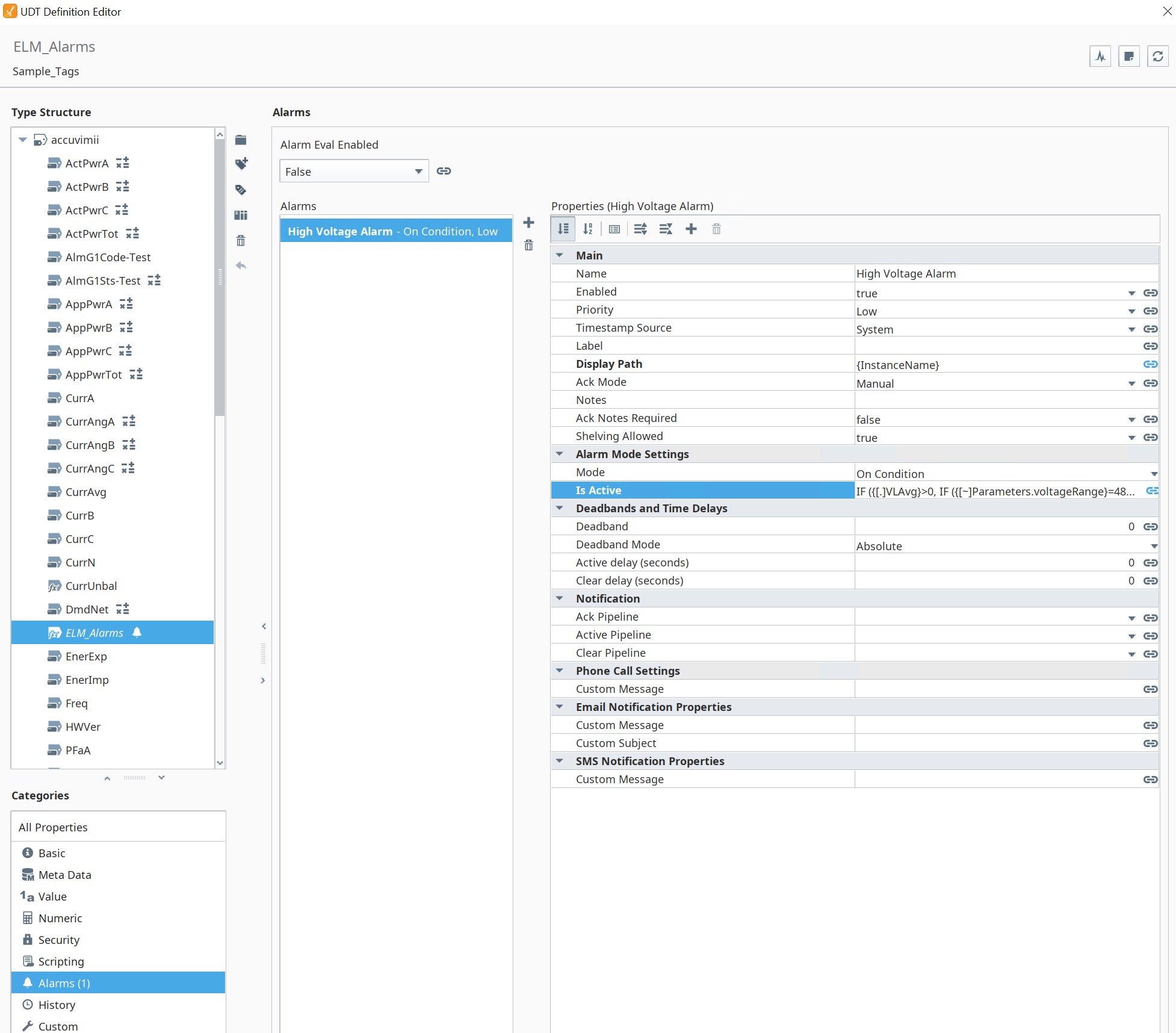
I have a bunch of UDT's set up for different device manufacturers. I would like to set up a umbrella Expression Tag to house all my alarms for each manufacturer UDT (would be better if I could do this above all UDT's if possible instead of for each manufacturer). For example, I am trying to set a High Voltage Alarm for several electrical meters. The problem is, I have multiple voltage ranges from 208V, 480V and 13.2kV, so I can't just say IF (Voltage Line > 480, true, false). This would enable alarms for the 208V meters and any meters that go above 480V. I thought I could add a UDT parameter "voltageRange" that I could use in an IF statement to check the above three voltages, then a second IF statement to set my condition above a high voltage setpoint to enable the alarm. But I cannot seem to get my expression code correct. Does anyone have any ideas how to get this to work? Please see images and description/code for how I have my Expression tag set up.
UDT with "ELM_Alarm" Expression tag with "Value" set to {[~]} (This was to view any tag inside the UDT)
High Voltage Alarm with "Alarm Mode Settings" set to "On Condition Mode" with "Is Active" set to IF ({[.]VLAvg}>0, IF ({[~]Parameters.voltageRange}=480, true, false)) (Please note I am trying to get my 480V meters to enable above VLAvg>0 just to test out the code)
I am successful using IF ({[.]VLAvg}>0, true, false) on the individual UDT tag VLAvg, this enables alarms, but for all voltages mentioned above. So I feel my code referencing the voltageRange parameter is incorrect, or using the ELM_Alarm expression tag.
OK, so looking at this again, setting my "Value" of the Expression Tag ELM_Alarms to {[~]} as a string works with using IF ({[.]VLAvg}>0, true, false) this gets successful alarms enabled. But why doesn't using IF ({[.]Parameters.voltageRange}=480, true, false) work the same? I set a UDT parameter of voltageRange = 480 for a single meter.
Nor does this work, IF ({[.]/Parameters.voltageRange}=480, true, false) IF ({voltageRange}=480, true, false)
Ahhh-haaaaa! Got it to work!! See I just needed some of you to view my mubbling to get it to work, LOL!!!
SOLUTION IF ({voltageRange}="480" && {[.]VLAvg}>0, true, false)
BUT..............
Can this be done above all UDT's? Please see image. Can it scan all UDT's below and enable alarms?
This doesn't seem to work when setting the Expression tag value: {[.]../..}
My first few original posts where inside a UDT, when using {[~]} for my Expresssion tag value, the High Voltage Alarm code IF ({voltageRange}="480" && {[.]VLAvg}>0, true, false) works perfectly and enables alarms.
Why won't this work above all UDT's using {[.]../..}, this was the path to the main UDT tag folder?
Even using {[~]} doesn't enable alarms either. In theory, this should work as this is the main folder for all my tags, both UDT and others. What gives?
Using {[.]} to point at the root of a UDT instance is a valid expression only because UDT instances will deliver the entire UDT as a Document. Folders don't do that.
I'm still confused what you're trying to do. You want a single tag to have a high voltage alarm that turns on whenever a bunch of voltage tags across multiple other UDT inctance go above certain voltages, based on the meters themselves?
If so, you should do the logic for the alarm within an expression tag within the indivudal UDT definitions, this will give you a bool alarm no alarm. Pass in the voltage high sp, or use a tag if there is one.
Then have an external expression tag that ORs the individual bools together. I don't think there's a nice way to dynamically bind this tag to a dynamic set of UDT instances
You are correct. It seems that I am only able to do this nested inside a UDT definition, using the following:
Setting my "Value" of the nested Expression Tag called ELM_Alarms to {[~]} as a string, using IF ({[.]VLAvg}>0, true, false) alarm testing for high voltage above zero. This looks at/monitors all my meters that use the same defintion and returns alarms.
I have around 12-15 UDT definitions (likely more for future integration) adds time and management to the project. My question revolves around decreasing time and management in hopes to have the Expression Tag called ELM_Alarms nested outside of all my UDT definitions. That way I program once, add or remove once, not having to go through each UDT definition. I believe @pturmel answered the question, using {[~]} outside of all UDT definitions won't work since they are in seperate folders. I'll be honest, I don't understand how this works in the background, it working nested inside vs nested outside the UDT definitions. Either case, I at lease am able to minimize some alarming programming using the "nested inside" method which is HUGE!
You tagged this as v8.3. Are you not able to use the built-in alarm status tags?
FWIW, I would not try to pull all of your alarmable values into a single expression, as that expression with evaluate for every tag change it references.
Individual alarms attached to their atomic source tags are the most efficient. Build this into your UDTs.
I have not been able to find anything solid or near this type of alarm scheme with 8.3 that I am looking for. The only thing I see for "Alarm Status Tags" was pinged with a browser search for v7.9. If you are referencing Alarm Status Tags as the Alarm Metrics in v8.3, yes, I have read through many documents/videos on Alarm Metrics but nothing suits how I would like to handle alarming as a UDT definition. UDT definitions are SOOO POWERFUL. I create one UDT definition for each of my meter manufacturers that use the same data type polling (typically Modbus), edit the Modbus unit ID, and I am linked to all meters. If I ever need to add or remove a data point, I do it once with the UDT definition. This is the same thing I want to do with alarms that look for anything inside the UDT definition.
Speaking of, using the method of an Expression Tag with a Value set to {[~]} which is nested inside a UDT definition with Alarm Mode set to "On Condition" and "Is Active" set to IF ({[.]VLAvg}>0, true, false) has been working perfectly of late. I have had it running over night and everything seems to be working OK. I have see my alarms go active, clear, etc. with no issues in live time.
I'm also having trouble tracking why you are going about it this method. Each UDT should have it's own alarm configuration and you set the setpoints and enables via Parameters on the UDT. You can even bulk write to those Parameters if you want to save config time. Within each UDT name the alarms appropriately. The UDT generates the alarm.
And then for your alarm monitor if you only want to extract the High Voltage Alarm's then you would use an expression like below and adjust it accordingly for the relative folder path and/or minimum severity.
isAlarmActiveFiltered("[.]../*", "High Voltage Alarm", "*", 0, 4, 0, 1, 0)
Edit: Oh I see you want only a subset of alarms based on their specific voltage. If that's the case I'd probably just be lazy and create a HV alarm for each level and then only enable the relative one via Parameters and then in the filter use HV alarm 208V or whatnot.
Yeah, this is not what I want to do for programming, management, maintenance. Most of my devices with UDT defintions have around 50-60 tags under them, I have around 250 devices that is 15000 just on those devices/meters. Then, I have circuit level meters with 30 channels, which would also get around 50-60 tags under each channel. That is around 1800 for a 30 channel meter, I have around 50 circuit level meters, that totals 90,000!!! Ewww, the amount of time to do each tag individually.
This is why I need a single Expression Tag nested under each UDT definition that would look/scan for the alarm inside the UDT definition
Edited: Again, I have implemented this method and it is working really really good. But would work BETTER if I could nest this method outside of each UDT and set up a single alarm scheme to look at all UDT's
No, you set up the alarms in the UDTs. So you only touch the definitions and the instance parameters.
Your deployment sounds very much like a typical Solar plant, where UDTs are the solution to the kind of complexity you describe. Build the alarms into the UDT definitions.
This is what scripting is for so you can edit the tag json in bulk, either direct in script or via edits made in excel.
As everyone is saying, you should be using tags within the UDT definitions for your alarms. You are using a bizarre quirk which another integrator looking at the project would raise their eyebrows at.
Also, for all of those UDT instances and tags you mentioned, you are subscribing to all of them via those expression tag refs to the UDT root level. This will be impacting your gateway and affecting the scalability
But these 30 meters are all an instance of a single UDT definition I would hope?
Unfortunately, with deploying circuit level meters, normal panel circuit definitions/load descriptions will be different in every panel that the circuit level meter is measuring. So no, they are not UDT's.
Do the number of tags change though? Does the structure change? Or are there structures that repeat? I can't believe that every meter would have a different set of tags. A screenshot would help of the tag structures