I’m having some unexplained behavior regarding closing popups. Closing the popup through a button causes the main window to swap back to my overview [home screen].
This persists through the built-in navigation selection in scripting and manually writing out the system.vision.closeWindow("Popups/NAME") command.
This does NOT happen whenever I use the event handler for loss of focus on the popup with the same script.
The resolution was to set the popup to be on the same layer as the main windows.
While I have found a workaround, it leaves me with more questions than before. I’ve included as much detail as I could below, in case it’s helpful…probably a bit overkill, but you never know what may be helpful.
My questions are why this behavior happens without having identical layers, and why it would happen only from the button and not from the loss of focus? I’m at a complete loss.
I suppose a followup question would be what are the downsides of having the popups on the same layer as the windows?
The structure of the screen is a docked navigation tab strip at the top, a docked info bar at the bottom, and swapping main windows in the middle. (Reference image below.)
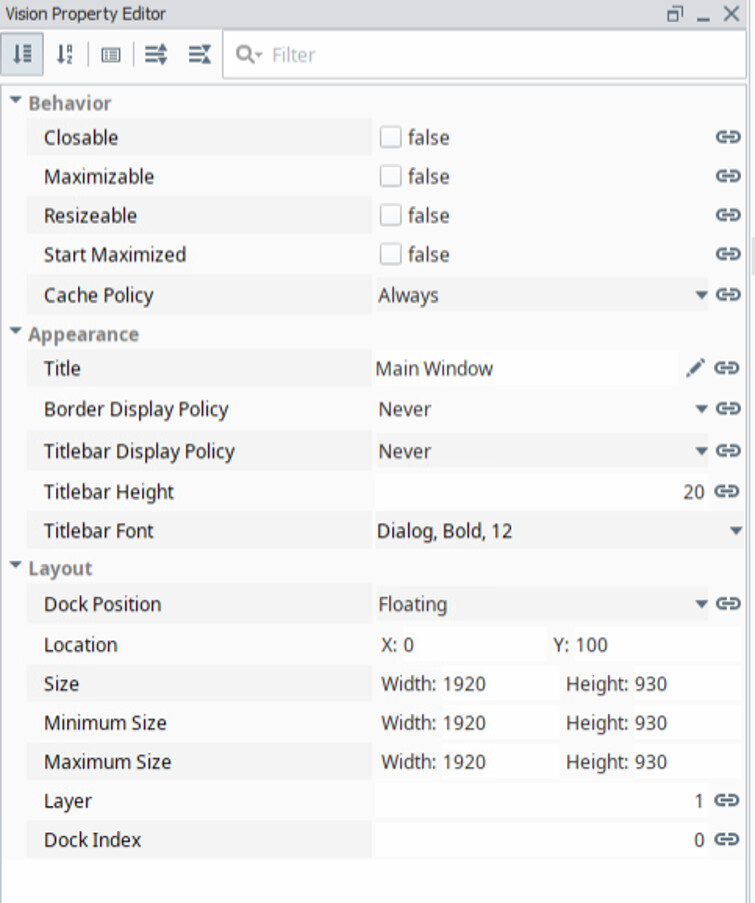
All main windows have a cache policy of Always.
All main windows have a Layer of 1
All Popups have a Layer of 2
Overview screen is a main screen that is only distinctive as being the only main window opened on startup.
Settings screen is simply putting a name to it so I’m not saying “the other main window” every time. Behavior is the same from any main window.
The behavior was persistent across all popups and all main windows.
Popups were tested being closed with three methods:
A button’s actionPerformed event handler using the code system.vision.closeWindow("Popups/BURNER_START_RESET")
Both default buttons and momentary buttons were tested for both methods.
A button’s actionPerformed event handler using the “Close” radio button under the Navigation tab of the scripting window.
*The popup window’s internalFrameDeactivated event handler using the “Close” radio button on the Navigation tab
The popup window was tested on layers 1-5.
The behavior persisted on all except 1.
The popup being tested had all bindings and scripting removed except for what was needed for testing. All components except for the buttons to test were also removed.
That way you don't need to 'worry' about puting the right window name in the closing function (and making mistake to close the wrong window).
I always have 1 main window, opened at startup, with layer 0 and 'Start Maximized'=True. If I need to change the main window, I'm using 'system.vision.swapTo(path)' to open another main window with layer 0 and 'Start Maximized'=True.
Your "main" are not Vision Main Windows, as you've changed their start-maximized properties. Which means they are not suitable to use with window swapping, nor will they cooperate properly with Vision's "Current Window" tracking. (Which only works with window swapping of actual main windows.)
If you really want your "main" windows to not be maximized, you cannot use normal tabstrip navigation that handles window swapping and current window tracking for you. You will have to script everything.
Let me repeat: window swapping only works properly with maximized main windows, and only if there is only ever a single one open. (All main windows must be opened by swapping.)
See the "INFO" box just below the graphic on the linked page.
Your tabstrip is getting confused by the lack of proper main windows. Since it is set to auto-open windows, and with the "current window" being unreliable, the tabstrip can pseudo-randomly open anything on its strip.
That is incredibly useful...I'm not sure how I missed that functionality with the rounds of navigation troubleshooting on past issues.
This is actually how I initially had it. I should have included that in the steps, but I must have lapsed. I changed to the system.vision.closeWindow("Popups/BURNER_START_RESET") method in an effort to test if it was grabbing the wrong parent window and causing weird interactions on the back end of the navigation....Reading that reasoning after a full night's sleep sounds questionable, I'll admit.
As for ensuring the filepath was correct, I used "copy path" from the project browser to make sure it was correct.
Noted. Thank you for the link and details.
&&&
Thanks for the feedback and suggestions! I'll restructure my "main" windows and see how that and using the swapTo command works. I'll update when I have some observations.
The thing that confuses me the most is:
The popup just closes as I would expect. It's using the same script, just a different triggering event. It's weird.
I'll give a look at the template and see if that sheds any light on the situation.
It certainly wouldn't be the first and won't be the last. Probably some box that I checked at the end of a long day that seemed like a good idea at the time....
You got me. I found it while arranging the screenshots to answer you.
For whatever reason, I had a script on the docked navigation window, itself. This script wrote to the selected tab property. If I remember correctly, this was probably a bandaid to get around an issue I had of the opening window not always being the overview screen despite it being set as such.
The biggest issue with the way I had it configured was that it happened on both focus gained and opened. (This explains some other squirrely behavior I noticed as well.) That explains why losing focus of the popup didn't cause it to navigate because I wasn't gaining focus on the docked navigation window.
As they say, the good thing about coding is that it does exactly what you tell it to do. The bad thing about coding is that it does exactly what you tell it to do.
Thank y'all so much for the help over the holiday weekend! I really appreciate it.
A quick followup question on swapTo navigation with main windows: Before I corrected my main windows to start maximized, the transition between screens that had been loaded previously was instantaneous. (I have them set to cache always.) After correcting that, the graphics now have to reload. It's a minor delay, but it's enough to be noticeable after having nothing there. Is it normal behavior for cached windows to have to reload graphics when they're swapped to, or do I have some other issue to dig into?